
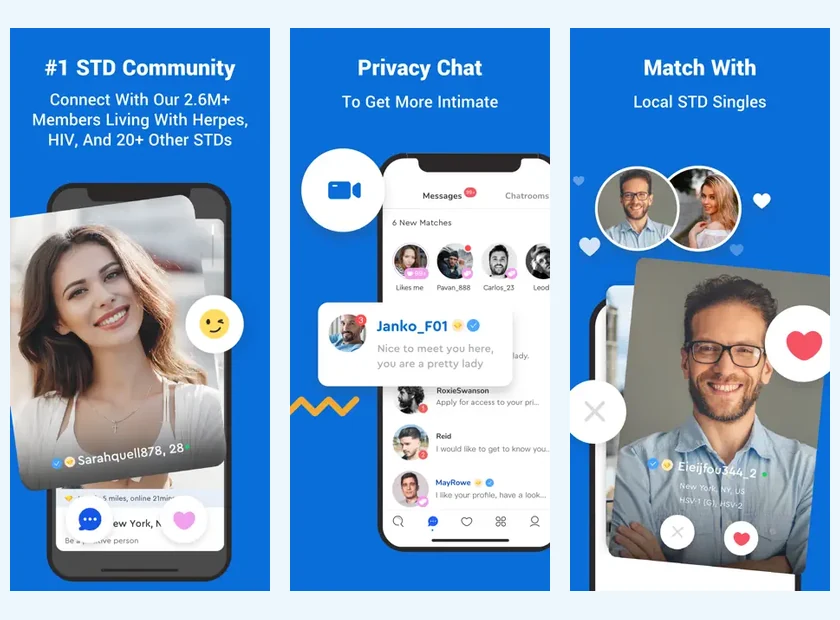
Find PositiveSingles on the App Store
The App Store listing is labeled “Positive Singles®: Herpes Date” and lists PS Support, Inc as the provider. This detail helps you distinguish the product from applications that talk about similar themes. The download button leads to the App Store path provided for this application.
Before installing, look at the compatibility and information presented for your device. The listing checked mentions iOS 14.0 or a later version. A technical requirement may change with updates; the App Store displayed on your phone remains the place to confirm current compatibility.
The free download gets you started, while in-app purchases are available for some features. Treat these as two separate decisions. Installing the product and deciding on a subscription are distinct choices, to be made according to your desire to discover and then use the service further.
Stay in Touch Without Being Always Available
The iPhone can facilitate a return to a conversation between two activities. To keep this usage pleasant, choose times when you can actually read what the other person writes to you. An attentive response, even later, often provides more than a quick message that does not include any details of the conversation.
You can simply announce a rhythm: “I mostly check my messages at the end of the day.” This phrase allows you to remain open without promising permanent availability. It also gives others the freedom to explain their own way of communicating.
When planning a meeting, use this mobile comfort to refine a proposal, not to negotiate everything at the last minute. A date, public location and approximate duration provide a framework. Our first date guide helps turn a pleasant exchange into a clear invitation.
Choose Your iPhone Photos Thoughtfully
The phone often contains a lot of photographs taken in different contexts. Choose the ones that represent you today rather than the images that simply received the most reactions elsewhere. A recent portrait and a scene related to an activity can be enough to open a first conversation.
Before publishing, look at the elements around you: recognizable people, names, documents or very specific places. You can remove a photo without sacrificing a warm presentation. Discretion sometimes comes down to the choice of image, not just an option in the settings.
Then reread your profile next to the photos. Together, they should give a consistent impression of you. If your text talks about a simple daily life but all the images show exceptional trips, add a detail closer to your usual life. The profile guide provides a method for finding this balance.
Check the Languages in the French Listing
The presence of the app in the French App Store does not mean that its interface is translated into French. The list consulted mentions German, English and Spanish. This point deserves your attention if you wish to use only a French interface.
The language of conversation remains another question. You can write your profile in French, specify that you speak English if this is the case and look for exchanges in the language where you feel most comfortable. A clear language preference can facilitate initial contacts, especially in an international community.
The app overview shows both platforms. If you also use a computer, the site or application comparison will help you distribute tasks according to your comfort, without assuming that all screens display exactly the same options.
Understand Purchases Through Apple
The French store listing displays several in-app purchases in euros. Some amounts correspond to durations of one, three or six months, but the list contains several references. So do not assume from a single public amount that it will automatically apply to your account.
Before confirming a purchase, read the total, duration and renewal terms presented on the screen. Then find the receipt and subscription in the relevant Apple account. The PositiveSingles prices page separates dollar references from French in-app purchases to avoid a misleading comparison.
Keep in mind that deleting the app and stopping a renewal are two different steps. If your question is about an Apple purchase, use the information from that purchase and the corresponding account management tools. Login access alone does not constitute proof of the status of a subscription.
Control Lock-Screen Message Previews
A notification can be useful for finding a conversation, but its preview may be visible to someone near your phone. Look at the notifications and preview settings available in your version of iOS. Choose what fits your environment, rather than accepting all displays without reviewing them.
Phone lock, notifications and profile settings act at different levels. None replaces the others. You may want to be easily reachable in the app while keeping chat details off the lock screen.
Once you have checked these settings, return to what you want from dating. Download the app, find your account if you already have one, then take the time to discover a profile that really makes you want to respond.
Move to a New iPhone Without Starting Again
Before changing phones, make sure you can retrieve the address and password for your existing dating account. Keep any Apple purchase receipt separately: access to your profile and management of billing are different matters. On the new device, sign in to the account you already use before considering a new registration. This avoids looking for old conversations inside a profile created by mistake.
Then review notification previews on the new lock screen. Restoring a phone should not replace checking how private messages actually appear in your surroundings. If a paid feature is missing, identify the purchase and contact the relevant support channel before buying again.
Product sources: PositiveSingles HelpApp Store France