
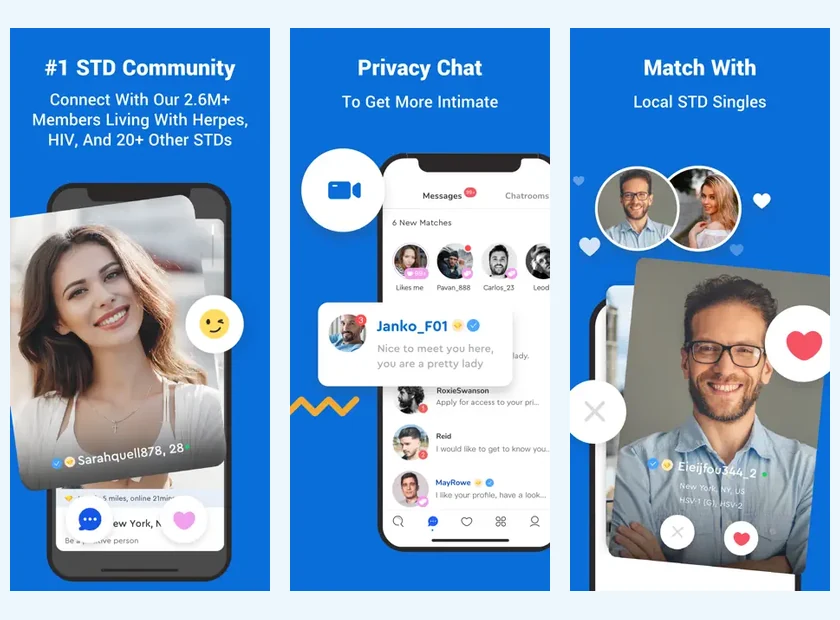
The PositiveSingles App Keeps Conversations Close
A dating app is useful when it facilitates mindful presence, not when it fills every available minute. PositiveSingles allows you to find a specialized environment from your phone. You can read a message, discover a profile or continue a conversation when you really want to devote attention to it.
This format may be suitable if you rarely use a personal computer or if you like to return briefly to your conversations during the day. It does not require you to respond immediately. You can choose a rhythm and express it in your profile or in a conversation, so that a lack of prompt response is not interpreted as a lack of interest.
| Device | Where to start | Detail to consider |
|---|---|---|
| iPhone | App Store, provider PS Support, Inc | The reviewed language list does not include French. |
| Android | Google Play, Positive Singles app | Check availability for your device. |
| Computer | PositiveSingles website | A keyboard can make profile writing easier. |
Choose Your iPhone or Android Download
PositiveSingles has an App Store listing for iPhone and a Google Play listing for Android. Use the button corresponding to your device to reach the correct store. Check the product name and publisher information rather than installing a file received in a conversation or found on a download site unrelated to the service.
The iPhone page specifies the key details in the French store listing, in particular the languages and in-app purchases. The Android page explains how to find the app on Google Play and discovery habits on the phone. Both platforms share a dating intent, but their screens, permissions, and billing may differ.
The download is free; some features require a subscription. This distinction allows you to explore the product without confusing installing the app with purchasing full access to all the tools.
Recognise the Product Before Installing
The visuals presented here come from official store pages and illustrate the product published by the brand. They help you recognise the app, not to guarantee that a screen will be strictly identical on your device. Versions and presentations may change, while your own account information depends on your usage.
Take a few moments to read the listing before installing: name, publisher, compatibility and confidentiality information. It is not necessary to memorize all the technical information. The main thing is to know what service you add to your phone and where to find its help.
If you already have an account, keep your credentials handy in your password manager. An installation on a new device should not automatically lead you to create another profile. The continuity of your conversations will be easier to understand if you stay on the right account.
Make Short Sessions Meaningful
A few minutes can be enough to read a message carefully and prepare a response. On the other hand, constant consultation can make you feel like you have to react to every signal. Choose a way to use the app that leaves room for your life, your work, and the people you already know.
A simple example: you discover a message during a break, then you respond to it later when you can write in peace. You can say that you enjoyed the topic and will come back in the evening. This continuity is often nicer than a series of rushed responses that don't really follow the conversation.
The first message guide provides easy-to-customize openings. On mobile as on computer, a question related to the other person’s profile provides more material than a message sent solely to check their presence.
Write a Profile That Reads Well on Mobile
Short paragraphs and concrete details are particularly useful on the phone. Start with details that make someone want to know you: your lifestyle, an activity or your relationship goals. You will be able to develop certain topics in the conversation rather than accumulating a long text from the first reading.
The photos are also worth checking on the real screen. A very wide image can make your face difficult to see; a group can leave doubt about the person represented. Choose a selection where you are recognizable, then check the visibility settings offered.
You can prepare your text elsewhere and proofread it before publishing it. The site or application guide explains how to choose a device for each task. There is no need to write everything with your thumbs if a keyboard allows you to find your words better.
Check the App’s Available Languages
This site offers French and English reading, but this does not determine the language of the installed application. The iOS listing consulted lists German, English and Spanish; it does not allow us to promise an iPhone interface in French. The screens and languages available should be distinguished from the language in which you write to another member.
You can indicate in your profile which languages you want to use for your conversations. This clarification is useful in France, where an international service can bring together French-speaking and English-speaking residents. It avoids assuming that a common location necessarily means an identical linguistic preference.
For Android, see the information displayed on your Google Play listing and in the app available for your device. We do not automatically infer Android languages from the iPhone list.
Move from Download to First Conversation
After installation, start by checking the account used and your profile. Then browse a few profiles before multiplying the reactions. You'll have a better sense of your own search if you take the time to recognize the details that make you want to talk.
If a feature prompts you to choose Premium, return to your goal: are you looking to initiate a conversation or change a particular setting? The free access and prices pages help you understand this decision. A subscription should serve your needs, not replace reflection on what you want from dating.
Now choose the right download for your phone. A sincere first introduction and a two-way conversation is a better start than being online all the time.
Prepare Before Changing Phones
Keep a reliable record of the email address used for your dating account before switching devices. If you have a paid subscription, also retain the receipt and the purchasing account. These are separate records: one helps you sign in, the other helps you understand billing. After installing on the new phone, review notification previews again. A new device may display them differently, even when you are returning to the same conversations.
Product sources: PositiveSingles HelpApp Store FranceGoogle Play