
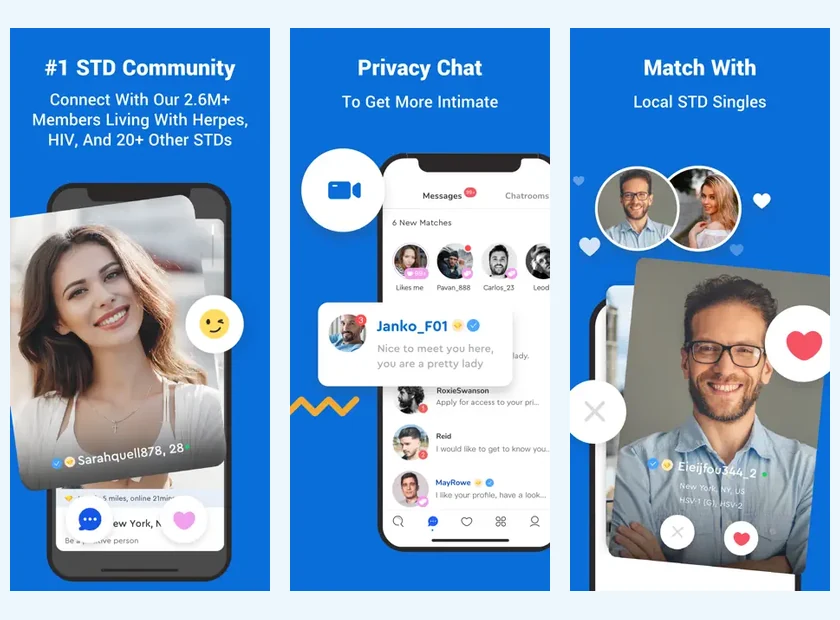
PositiveSingles Features Start with Your Profile
The profile brings together the information from which another person may want to talk to you. A photo attracts attention, but the details of your profile provide something to talk about. Profile features are therefore useful before you even think about sending a message: they create the context for your first impression online.
Choose what represents you today. A regular activity, a cultural preference or a desire for a relationship say more than an ideal portrait of the person you think you should be. If you want a serious relationship, you can express it simply without turning your description into a list of conditions.
The profile guide provides example wording. It's not about filling every available space at all costs, but about publishing enough information so that a conversation can begin other than with a very general question.
Choose Public or Private Photos
PositiveSingles features public and private photo options. Their interest is to distinguish what you want to show widely from what you prefer to share more selectively. This distinction is particularly useful when you want to take the time to get to know a person before opening your life further.
The private album remains a way to control access, not a guarantee that no image can be kept by a person authorized to see it. So select photographs that you are actually willing to share in this context. Removing access later does not necessarily erase what has already been viewed or remembered.
A small, coherent selection can be enough: a current portrait, an image linked to an activity and possibly a more spontaneous photo. Check the settings for each image instead of assuming that all automatically follow the same visibility level. This verification gives concrete meaning to your decision to publish.
Browse with Search or Flame
Search allows you to review profiles based on available filters. Flame, described in the official help, facilitates a visual way to browse where you can mark an interest or pass. A person who knows precisely which area to explore may prefer to start with search; another will appreciate a more visual first journey.
These two habits are not mutually exclusive. You can discover a profile quickly and then take the time to read their profile. Your reaction is then only the beginning, and not the whole of your judgment on compatibility. A photo doesn't always tell you the language of conversation, the relationship goals or the availability.
For location, use a perimeter that corresponds to your life. The directory of dating in France offers several regional options. It can help you think about your search, without pretending to know the results that will be offered in your account.
Use Winks and Personal Messages Intentionally
A wink allows you to briefly signal interest. A personal message gives more room for a question or observation. It is helpful to choose the tool based on what you have to say. If you liked a specific detail, a sentence relating to it may be easier to continue than a sign without context.
Communication possibilities depend on the access level. Official help distinguishes in particular the free response to a message initiated by a Premium member and the initiation of a conversation. The free comparison explains this limit without confusing all forms of interaction.
Once the conversation is started, sometimes the best feature is simply the time to read. Responding to what was just said, rather than immediately moving on to a new question, shows that you are interested in the person. The tools facilitate this contact; they do not replace this attention.
Put Profile Activity in Perspective
Some Premium features allow you to see more information about visits or likes. They can help you discover someone you might not have noticed. However, they do not reveal the exact reason for a visit or what someone thinks of you.
Avoid interpreting every signal as a definite invitation. A person may browse a profile out of curiosity, come back to read it or not yet know if they want to write. Conversely, the absence of a visible signal does not allow us to conclude that your profile is of no interest to anyone. Displays and settings don't tell the whole experience.
If activity information gives you a good reason to open a conversation, keep it natural. There is no need to start by asking why the person viewed your profile. Commenting on what they share is often more welcoming and leaves a freer response.
Explore Community Conversations
The service presents spaces for discussion and community content. They can offer another rhythm than individual messaging: reading an experience, participating in a discussion or discovering how other people express a difficulty. This dimension can accompany a dating experience without being confused with it.
Respect the intention of a collective exchange. A person who comes to talk about a sensitive subject does not necessarily expect a romantic approach. If you want to get to know each other, take into account their comments and their boundaries. The community context is more pleasant when everyone can participate without having to accept a personal invitation.
Shared experiences do not replace individual medical information. A story can help you find words or feel understood; it does not allow you to determine your health situation. For a medical decision, speak to a qualified professional rather than relying on a dating platform.
Use Visibility Settings to Support Your Boundaries
Privacy settings help you choose how your profile and information is presented. The FAQ specifies, for example, that hiding the profile is one of the Premium possibilities. Before relying on a setting, check its presence and effect in your account, as the options and their access may change.
Your own choices remain complementary. A username is not enough to anonymize a photograph identical to that of your professional profile. A description can reveal a lot of information without containing a name. The security guide gives concrete examples of this combination of settings and published content.
You can review these choices when your situation changes. A new relationship, a break or a change of device are good opportunities to look at what remains visible. The idea is to keep the settings understood, rather than checking options once and then forgetting them.
Match Your Tools to Your Dating Goals
For a first week, you can focus on your profile and discovery. If a conversation begins, your focus will shift to messaging and the pace of responses. Later, reflecting on a real encounter may be more useful than exploring another feature.
This progression helps avoid getting distracted. A tool-rich platform doesn't require you to use them all. Choose an action that gets you closer to a quality conversation, then see if it works for you. The how it works guide places the features in a path going from the account to a first date.
If you want more mobility, the application can facilitate the return to conversations. If an option requires Premium, take the time to review the pricing and your expected usage. The best set of features is the one you understand and use in the service of a mutual connection.
Connect Each Feature to a Dating Task
Suppose you have little time this week. Search helps you narrow the profiles worth reading; a clear profile helps someone understand you; messaging helps you learn whether an interest is mutual. These functions solve different problems. Adding more filters will not make an unclear introduction more personal, and a polished profile cannot replace responding thoughtfully. Start with the part of the process that currently needs attention, then use the relevant feature. This keeps the product useful without making feature exploration an end in itself.
Product sources: PositiveSingles Help