
Choose the PositiveSingles Website or App by Task
The best device is the one that allows you to do what you want with enough attention. A computer may be nicer for writing a profile or reading terms. A phone can make it easier to return to a conversation. These benefits don't force you to choose just one format for your entire experience.
Ask yourself what task you find difficult today. If you type slowly on phone, the keyboard can help. If you hardly ever turn on your home computer, an app can make chatting more accessible. A useful device choice solves a real difficulty in your routine.
Write Your Profile on a Larger Screen
A large screen often makes it easier to reread a text as a whole. You can see the progression of your ideas, spot a repetition and move a sentence without losing track. This can be especially nice if you want a profile in two languages or if you take the time to choose each wording.
The keyboard also allows you to prepare a draft in a personal document before publishing. You can remove information that is too specific, shorten a passage or choose a more vivid example. The profile guide provides an editorial method that works regardless of device.
However, avoid writing on a shared computer without thinking about the traces left: saved document, open session or memorized password. Writing comfort must remain compatible with your environment. You can use a personal device or delete your local draft when you no longer need it.
Keep Conversations Close on Your Phone
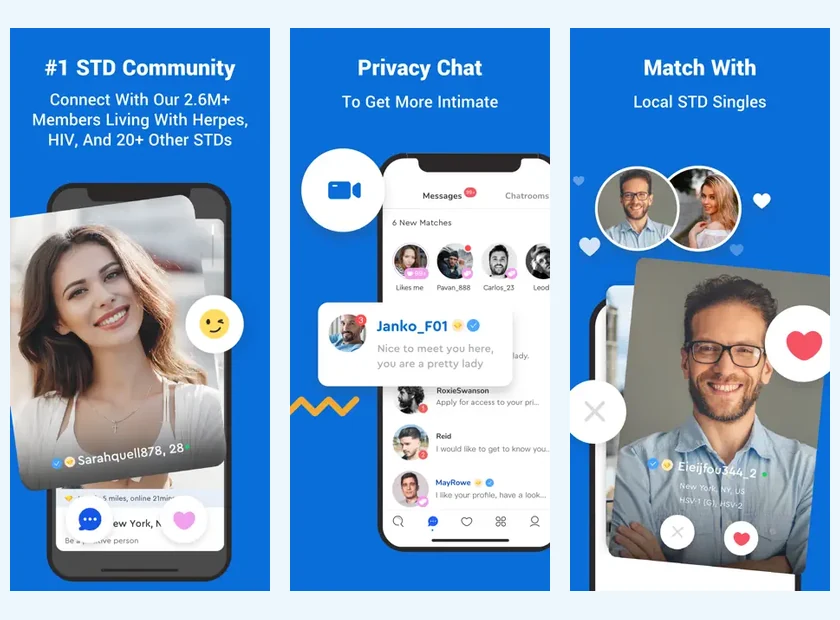
The app can make a conversation easier to find throughout the day. You don't have to wait until you're at a computer to read a message. This continuity can be pleasant when discussions are already underway and you want to stay present without organizing a long session.
Ease of access should not become an obligation to respond immediately. You can read and then come back later with a thoughtful response. Announcing your pace in a conversation can prevent the other person from interpreting each delay as a sign of varying interest.
The iPhone and Android pages provide the corresponding download access. Choose your device platform and check the official store listing. A download link received from a member is not necessary to continue a conversation.
Read the Details Before a Purchase
For a subscription decision, use the device on which you most easily read the conditions. Look at the total, currency, duration and renewal. A smaller screen should not lead you to validate an offer whose details you do not understand.
The purchasing channel matters more than the device you then use to chat. A purchase from an app store can be handled by that store, while a purchase on the site follows its own journey. Keep the receipt so you know where to find the information rather than relying on your memory.
The prices page distinguishes public references in dollars from in-app purchases displayed in euros. It does not assume that the same amount applies everywhere. Comparing numbers without considering currency and duration can give a misleading impression.
Keep Your Account Consistent Across Devices
If you use several devices, make sure you find the existing account. A new registration with another address may create a separation between your conversations and your information. Before concluding that content has disappeared, check the identity of the account in which you are connected.
Keep your email address and password in a suitable manager. If you have forgotten your access, the login page presents ordinary recovery. Do not email your password or give it to anyone who is offering to help you with a dating conversation.
This continuity also concerns your profile. If you modify it, see how it appears on the other device when possible. A pleasant paragraph on desktop can be very dense on mobile; a selection of photos may be clearer after checking on the phone actually used.
Separate Interface and Conversation Languages
A site read in French does not guarantee that all the steps of another service or application appear in this language. The iPhone listing we reviewed does not list French among its languages. This detail may influence your choice if you wish to avoid browsing in another language.
You can distinguish between the interface and the conversations. A person can use an English interface while writing their profile and messages in French. The important thing is to know if this operation suits you and to specify your preferences to the people with whom you communicate.
For Android, look at the information actually displayed in Google Play and on your device. We do not automatically transfer an iOS feature to Android. The application guide brings together the commonalities while retaining these platform differences.
Review Notifications and Shared Screens
On phone, notification previews can make a message visible outside the app. On a computer, an open session or a tab left on the screen can expose the conversation. Ordinary risks are not the same, but they can both be reduced by choices appropriate to your environment.
Think about who uses or sees your device. You can limit previews on a phone and sign out of a shared browser. These actions don't automatically change your profile information: device and account privacy are two separate levels.
The PositiveSingles safety guide connects these questions to photos and relationship boundaries. It's more helpful to understand a few important settings than to look for a general promise that one medium will always be more secure than the other.
Try a Simple Division of Tasks
You can start by writing and proofreading your profile on the computer, then use the phone to continue conversations. Another person will prefer to do everything on mobile. The right choice can be recognized by the real comfort, the clarity of the information and the time you want to devote to it.
After a few days, observe what helps you and what distracts you. If notifications interrupt your day too often, adjust them. If you're putting off every response because the computer is rarely available, the app can make contact easier. Change one element at a time to understand its effect.
Your device should help you enjoy dating. Choose an organization that allows you to read, respond, and decide thoughtfully, then let the quality of the conversation guide what happens next rather than the frequency of your connections.
Try the Same Task on Both Devices
Compare devices using a task you already need to do, such as editing your introduction or answering a message. On a computer, notice whether the keyboard and wider text make writing easier. On a phone, consider whether you can comfortably find the conversation and manage its notifications. You are identifying what works for that task, rather than proving one device is better in every situation.
Keep the same dating account while comparing. Do not buy a second subscription simply because two screens show different options. First check the account address, the purchase channel and the receipt. Those details support a clearer help request than saying the phone and computer do not match.
You may settle on a simple division: use a keyboard for thoughtful profile changes and a phone for short replies. Revisit that choice if your routine changes. The best arrangement leaves you able to pay attention to the conversation without making account management a recurring distraction.